

I found some time. and in 15 minutes from this post we will go down for ~1 hour to ensure we have complete data consistency.
- 09:00 UTC to 10:00 UTC
See you soon!
HI!!!
Migrated Successfully!
Pictrs Test:

Working on fixing old.reddthat.com.
Fixed up. All seems to be working. 😪
For those of you who were watching, check out our possible new status page: https://statusv2.reddthat.com/ (it has our CPU/Ram/Disk usages on display for everyone to peruse)
old.reddthat.com is currently not working (at time of posting this comment). Most pages show
unable to retrieve site., although I did getdial tcp (an IP address):443: connect: connection refused.(where(an IP address)is an IP that I’ve redacted) on some pages.:( yeah the outage notification woke me up.
As it was late I did a work around to temporarily fix it. I’ll be looking at it once I’ve had coffee.
I believe I’ve fixed it.
A recent docker update no longer supports overriding hosts with hostnames. (I was telling mlmym that ‘reddthat.com’ is ‘lemmy-ui’. Which would make it request directly to the lemmy-ui container rather than going back out to CF and back again.
(For others/if you want to know the nitty gritty). I was doing this:
    networks:
      lemmy_internal:
    extra_hosts:
      - "reddthat.com:lemmy-ui"
Which did actually work, but now it doesn’t since I updated/installed docker compose v5.0.0. (Seems the correctly enforce the
host:IPformat now). So I had to do a work around.Thank you. It seems to be working now.
I remember having a devil of a time trying to get mlmym and lemmy to talk to each other on my local system when I was poking around at trying to fix some issues in mlmym a few months back. (I should really get back to that at some point…) They had “https://” hard-coded in front of the domain name parameter – and I didn’t want to have to change the Go source code just to get a dev environment up. I ended up working around it by modifying my hosts file (to add a .INTERNAL domain), ran things under podman with host networking, configured Apache on the host to reverse proxy into both containers, and set up a self-signed cert that I had to rebuild into the mlmym docker (by copying in the appropriate crt files + running
update-ca-certificatesvia the Dockerfile). In retrospect, I probably should’ve just modified the code…What was the workaround you had to implement to fix this one?
I had to tell our
main_nginxthat it is “reddthat.com”.services: proxy: image: docker.io/library/nginx ...etc... networks: default: lemmy_internal: aliases: - reddthat.comNow its:
{user} -> CF -> {server_nginx} -> {frontend_nginx} -> mlmym => ((docker internal network)) -> {main_nginx} -> {{lemmy-ui/api}}
Instead of:{user} -> CF -> {server_nginx} -> {frontend_nginx} -> mlmym => CF -> {main_nginx} -> {{lemmy-ui/api}}…and it’s down again. 🫠️
SORTED! Ended up patching it myself. Enjoy :D
😥. I will fix it! I think because we are still going via nginx, it’s still has to pass the go-away challenges, which it must be failing and thats why…
Annnd, as we just moved I also only have key access to the server and I made all new keys and don’t have one on my other devices yet. (A classic)
Edit: nope, it’s now attempting to connect over https to the container… I think I’ll need to write a proper patch for it to allow for a override.
It also looks dead in the water/feature complete. So I’ve moved to FSFs container. (https://github.com/Fedihosting-Foundation-Forks/mlmym).If I end up making a patch I’ll upstream. (I’m surprised LW hasn’t made one already)
Wooo! 🎉
Fun Pics:
- Disk 80%->20%
- Ram from 24GB
- CPU went from 25% (average) to 7% (average)
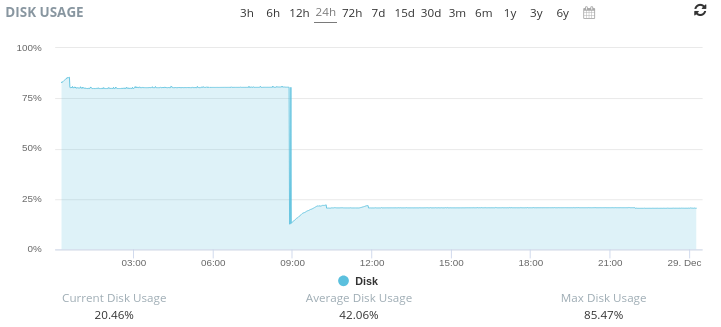
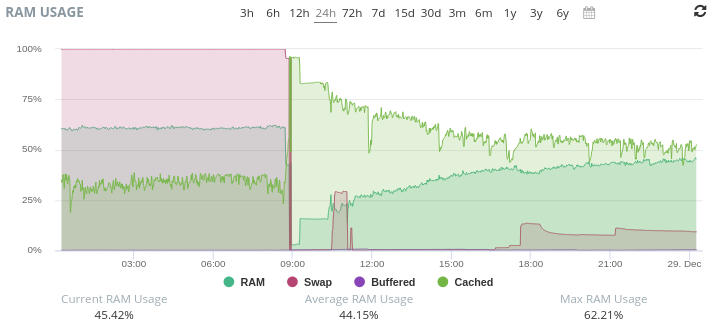
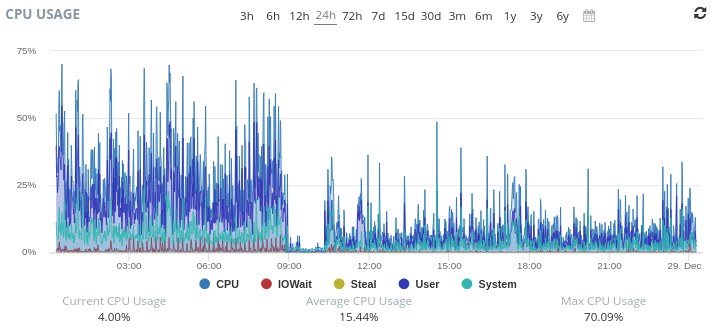
Thank you! Already a very noticeable difference in load times. Excellent. You rock ticoombs!
You rock too!
Can we have more dedotated wam?
We’ve got oodles of gigabits!

